Fixing GRUB: Showing Windows again
In my previous post, I mentioned that GRUB isn’t showing the Windows option in the boot menu. Let’s try to fix it.
The first thing I notice is GRUB failing to show the option but if I go to the UEFI, I can see Windows without problems, like in these two images.
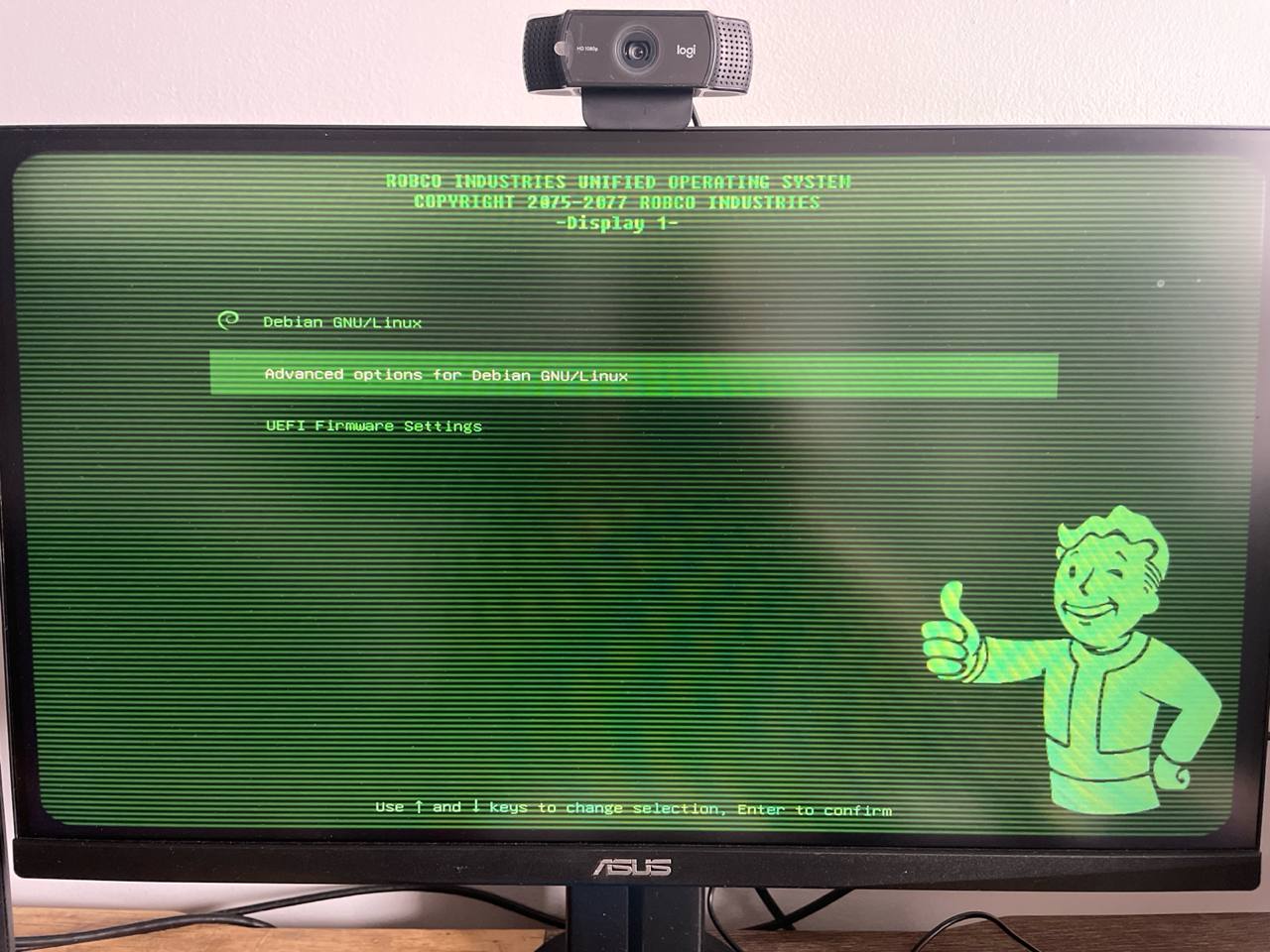 GRUB with only Debian options
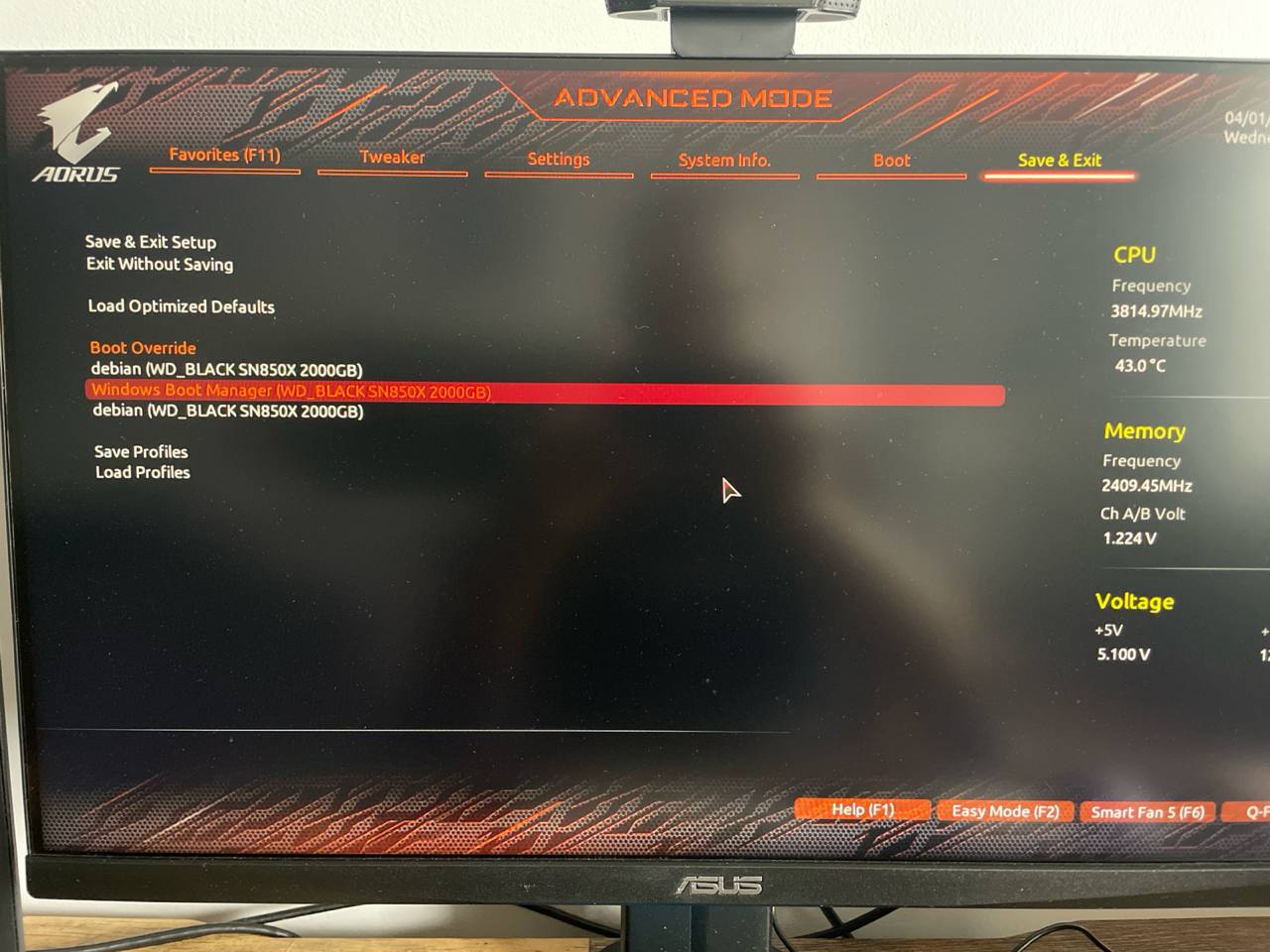 UEFI shows the Windows boot loader
The problem
GRUB can use something called os-prober, an small program that look for other operating
systems installed, so it can create a menu entry automatically, making our lives easier.
You should have by default, otherwise it is really easy to install, just run:
sudo aptitude install os-prober
Running update-grub didn’t run os-prober because it is disable by default:
1
2
3
4
5
6
7
8
9
10
11
12
13
14
15
sudo update-grub
Generating grub configuration file ...
Found theme: /boot/grub/themes/fallout-grub-theme-master/theme.txt
Found background image: /boot/grub/themes/fallout-grub-theme-master/background.png
Found linux image: /boot/vmlinuz-6.12.48+deb13-amd64
Found initrd image: /boot/initrd.img-6.12.48+deb13-amd64
Found linux image: /boot/vmlinuz-6.12.43+deb13-amd64
Found initrd image: /boot/initrd.img-6.12.43+deb13-amd64
Found linux image: /boot/vmlinuz-6.12.41+deb13-amd64
Found initrd image: /boot/initrd.img-6.12.41+deb13-amd64
Warning: os-prober will not be executed to detect other bootable partitions.
Systems on them will not be added to the GRUB boot configuration.
Check GRUB_DISABLE_OS_PROBER documentation entry.
Adding boot menu entry for UEFI Firmware Settings ...
done
To enable just edit the line GRUB_DISABLE_OS_PROBER=true to GRUB_DISABLE_OS_PROBER=false
in /etc/default/grub. Let’s try again.
It is disabled by default for security reasons.
1
2
3
4
5
6
7
8
9
10
11
12
13
14
sudo update-grub
Generating grub configuration file ...
Found theme: /boot/grub/themes/fallout-grub-theme-master/theme.txt
Found background image: /boot/grub/themes/fallout-grub-theme-master/background.png
Found linux image: /boot/vmlinuz-6.12.48+deb13-amd64
Found initrd image: /boot/initrd.img-6.12.48+deb13-amd64
Found linux image: /boot/vmlinuz-6.12.43+deb13-amd64
Found initrd image: /boot/initrd.img-6.12.43+deb13-amd64
Found linux image: /boot/vmlinuz-6.12.41+deb13-amd64
Found initrd image: /boot/initrd.img-6.12.41+deb13-amd64
Warning: os-prober will be executed to detect other bootable partitions.
Its output will be used to detect bootable binaries on them and create new boot entries.
Adding boot menu entry for UEFI Firmware Settings ...
done
Same result but os-prober is being executed. Very weird.
Let’s try to run os-prober alone and check the logs.
Remember that my current setup looks like this:
1
2
3
4
5
6
7
8
9
10
11
12
13
lsblk
NAME                MAJ:MIN RM   SIZE RO TYPE  MOUNTPOINTS
nvme0n1             259:0    0   1.8T  0 disk
├─nvme0n1p1         259:1    0   100M  0 part  /boot/efi
├─nvme0n1p2         259:2    0   2.4G  0 part  /boot
└─nvme0n1p3         259:3    0   1.8T  0 part
  └─nvme0n1p5_crypt 253:0    0   1.8T  0 crypt
    ├─debian-root   253:1    0   100G  0 lvm   /
    └─debian-home   253:2    0   1.7T  0 lvm   /home
nvme1n1             259:4    0 931.5G  0 disk
├─nvme1n1p1         259:5    0    16M  0 part
├─nvme1n1p2         259:6    0   931G  0 part
└─nvme1n1p3         259:7    0   509M  0 part
I just ran journalctl -b0 and went to the end.
(I am only show the logs relating to nvme0n1p1 and nvme0n1p2 to make it shorter).
1
2
3
4
5
6
7
8
9
10
11
12
13
14
15
16
17
18
19
20
21
22
23
24
25
26
27
28
29
30
31
32
33
34
35
36
37
38
39
Apr 01 17:34:40 debian-desktop os-prober[14090]: debug: running /usr/lib/os-probes/mounted/05efi on mounted /dev/nvme0n1p1
Apr 01 17:34:40 debian-desktop 05efi[14092]: debug: /dev/nvme0n1p1 is a FAT32 partition
Apr 01 17:34:40 debian-desktop 05efi[14100]: debug: /dev/nvme0n1p1 partition scheme is gpt
Apr 01 17:34:40 debian-desktop 05efi[14101]: debug: /dev/nvme0n1p1 partition type is ebd0a0a2-b9e5-4433-87c0-68b6b72699c7
Apr 01 17:34:40 debian-desktop 05efi[14102]: debug: /dev/nvme0n1p1 is not a ESP partition: exiting
Apr 01 17:34:40 debian-desktop os-prober[14103]: debug: running /usr/lib/os-probes/mounted/10freedos on mounted /dev/nvme0n1p1
Apr 01 17:34:40 debian-desktop 10freedos[14105]: debug: /dev/nvme0n1p1 is a FAT32 partition
Apr 01 17:34:40 debian-desktop os-prober[14108]: debug: running /usr/lib/os-probes/mounted/10qnx on mounted /dev/nvme0n1p1
Apr 01 17:34:40 debian-desktop 10qnx[14110]: debug: /dev/nvme0n1p1 is not a QNX4 partition: exiting
Apr 01 17:34:40 debian-desktop os-prober[14111]: debug: running /usr/lib/os-probes/mounted/20macosx on mounted /dev/nvme0n1p1
Apr 01 17:34:40 debian-desktop macosx-prober[14113]: debug: /dev/nvme0n1p1 is not an HFS+ partition: exiting
Apr 01 17:34:40 debian-desktop os-prober[14114]: debug: running /usr/lib/os-probes/mounted/20microsoft on mounted /dev/nvme0n1p1
Apr 01 17:34:40 debian-desktop os-prober[14117]: debug: running /usr/lib/os-probes/mounted/30utility on mounted /dev/nvme0n1p1
Apr 01 17:34:40 debian-desktop 30utility[14119]: debug: /dev/nvme0n1p1 is a FAT32 partition
Apr 01 17:34:40 debian-desktop os-prober[14124]: debug: running /usr/lib/os-probes/mounted/40lsb on mounted /dev/nvme0n1p1
Apr 01 17:34:40 debian-desktop os-prober[14126]: debug: running /usr/lib/os-probes/mounted/70hurd on mounted /dev/nvme0n1p1
Apr 01 17:34:40 debian-desktop os-prober[14128]: debug: running /usr/lib/os-probes/mounted/80minix on mounted /dev/nvme0n1p1
Apr 01 17:34:40 debian-desktop os-prober[14130]: debug: running /usr/lib/os-probes/mounted/83haiku on mounted /dev/nvme0n1p1
Apr 01 17:34:40 debian-desktop 83haiku[14132]: debug: /dev/nvme0n1p1 is not a BeFS partition: exiting
Apr 01 17:34:40 debian-desktop os-prober[14133]: debug: running /usr/lib/os-probes/mounted/90linux-distro on mounted /dev/nvme0n1p1
Apr 01 17:34:40 debian-desktop os-prober[14137]: debug: running /usr/lib/os-probes/mounted/90solaris on mounted /dev/nvme0n1p1
Apr 01 17:34:40 debian-desktop os-prober[14155]: debug: running /usr/lib/os-probes/mounted/05efi on mounted /dev/nvme0n1p2
Apr 01 17:34:40 debian-desktop 05efi[14157]: debug: /dev/nvme0n1p2 is ext4 partition: exiting
Apr 01 17:34:40 debian-desktop os-prober[14158]: debug: running /usr/lib/os-probes/mounted/10freedos on mounted /dev/nvme0n1p2
Apr 01 17:34:40 debian-desktop 10freedos[14160]: debug: /dev/nvme0n1p2 is not a FAT partition: exiting
Apr 01 17:34:40 debian-desktop os-prober[14161]: debug: running /usr/lib/os-probes/mounted/10qnx on mounted /dev/nvme0n1p2
Apr 01 17:34:40 debian-desktop 10qnx[14163]: debug: /dev/nvme0n1p2 is not a QNX4 partition: exiting
Apr 01 17:34:40 debian-desktop os-prober[14164]: debug: running /usr/lib/os-probes/mounted/20macosx on mounted /dev/nvme0n1p2
Apr 01 17:34:40 debian-desktop macosx-prober[14166]: debug: /dev/nvme0n1p2 is not an HFS+ partition: exiting
Apr 01 17:34:40 debian-desktop os-prober[14167]: debug: running /usr/lib/os-probes/mounted/20microsoft on mounted /dev/nvme0n1p2
Apr 01 17:34:40 debian-desktop os-prober[14170]: debug: running /usr/lib/os-probes/mounted/30utility on mounted /dev/nvme0n1p2
Apr 01 17:34:40 debian-desktop 30utility[14172]: debug: /dev/nvme0n1p2 is not a FAT partition: exiting
Apr 01 17:34:40 debian-desktop os-prober[14173]: debug: running /usr/lib/os-probes/mounted/40lsb on mounted /dev/nvme0n1p2
Apr 01 17:34:40 debian-desktop os-prober[14175]: debug: running /usr/lib/os-probes/mounted/70hurd on mounted /dev/nvme0n1p2
Apr 01 17:34:40 debian-desktop os-prober[14177]: debug: running /usr/lib/os-probes/mounted/80minix on mounted /dev/nvme0n1p2
Apr 01 17:34:40 debian-desktop os-prober[14179]: debug: running /usr/lib/os-probes/mounted/83haiku on mounted /dev/nvme0n1p2
Apr 01 17:34:40 debian-desktop 83haiku[14181]: debug: /dev/nvme0n1p2 is not a BeFS partition: exiting
Apr 01 17:34:40 debian-desktop os-prober[14182]: debug: running /usr/lib/os-probes/mounted/90linux-distro on mounted /dev/nvme0n1p2
Apr 01 17:34:40 debian-desktop os-prober[14186]: debug: running /usr/lib/os-probes/mounted/90solaris on mounted /dev/nvme0n1p2
Well /dev/nvme0n1p1 is my EFI partition as you can see here:
1
2
3
4
5
6
7
8
9
10
11
tree -L 2 /boot/efi/
/boot/efi/
├── $RECYCLE.BIN
│   └── desktop.ini
├── EFI
│   ├── Boot
│   ├── Debian
│   └── Microsoft
└── System Volume Information
    ├── IndexerVolumeGuid
    └── WPSettings.dat
And os-prober is doing a good guess but failing at the end:
1
2
3
4
Apr 01 17:34:40 debian-desktop 05efi[14092]: debug: /dev/nvme0n1p1 is a FAT32 partition
Apr 01 17:34:40 debian-desktop 05efi[14100]: debug: /dev/nvme0n1p1 partition scheme is gpt
Apr 01 17:34:40 debian-desktop 05efi[14101]: debug: /dev/nvme0n1p1 partition type is ebd0a0a2-b9e5-4433-87c0-68b6b72699c7
Apr 01 17:34:40 debian-desktop 05efi[14102]: debug: /dev/nvme0n1p1 is not a ESP partition: exiting
The hint here is that isn’t an ESP partition. So I went to Wikipedia for clarification.
It says:
The globally unique identifier (GUID) for the EFI system partition in the GUID Partition Table (GPT) scheme is C12A7328-F81F-11D2-BA4B-00A0C93EC93B, while its ID in the master boot record (MBR) partition-table scheme is 0xEF.
Now I wonder, what the hell is my partition type then?. The answer obviously was in Wikipedia again and it is called Microsoft basic data partition
Ok, what I think it happened what that when I created the partition I just created a normal FAT32 instead of the ESP. I believe there are other applications like Gparted where that is just a flag in the partition.
Let’s bring more information about my current partitions:
1
2
3
4
5
6
7
8
9
10
11
12
13
lsblk -o NAME,UUID,PTUUID,PARTUUID
NAME                UUID                                   PTUUID                               PARTUUID
nvme0n1                                                    e3ad8841-69b6-da4c-beb0-41e6bc8823d2
├─nvme0n1p1         CA0E-4D9E                              e3ad8841-69b6-da4c-beb0-41e6bc8823d2 b6b63fbf-cf7d-c540-89d9-a75b2d4beed4
├─nvme0n1p2         1142f508-b892-4bca-b0cc-ab1accdf9db9   e3ad8841-69b6-da4c-beb0-41e6bc8823d2 643bf828-09a6-8e43-9163-90da2eb669dd
└─nvme0n1p3         2a659480-bf29-4944-9d52-6d078bdfd346   e3ad8841-69b6-da4c-beb0-41e6bc8823d2 6dad6dff-7192-e44f-8366-87455e4ccc3f
  └─nvme0n1p5_crypt bPQHVr-kxof-cEZL-0eDN-XYEd-tYQY-PJBY6a
    ├─debian-root   274d68b8-66af-4652-a23e-b4e05ce6d4a8
    └─debian-home   aeeb4963-7f46-4eb8-8353-2b955efcc6f3
nvme1n1                                                    8f7de746-f934-461d-b03e-73f016dcad80
├─nvme1n1p1                                                8f7de746-f934-461d-b03e-73f016dcad80 75fe645a-5e19-4475-90a4-67a3d5286949
├─nvme1n1p2         D2A60EAEA60E92E1                       8f7de746-f934-461d-b03e-73f016dcad80 2ec6727c-d7d1-4dcf-8c0c-72b46d3f5a6d
└─nvme1n1p3         F44234364233FC44                       8f7de746-f934-461d-b03e-73f016dcad80 f866c9d8-62b1-4d61-84fe-ea542a5c6dda
- UUID: It is the UUID of the filesystem itself.
I can verify using
dumpe2fs:1 2 3
dumpe2fs /dev/nvme0n1p2 | grep UUID dumpe2fs 1.47.2 (1-Jan-2025) Filesystem UUID: 1142f508-b892-4bca-b0cc-ab1accdf9db9 - PTUUID: It is the UUID of the GPT partition table, it is shared among the partitions but not among the disks. Each disk has it’s own GPT partition table.
- PARTUUID: It is an UUID that identify a partition in particular.
The UUID and PARTUUID can be used to identify disks, for example, these two path are the same partition.
1
2
3
/dev/disk/by-partuuid/643bf828-09a6-8e43-9163-90da2eb669dd

/dev/disk/by-uuid/1142f508-b892-4bca-b0cc-ab1accdf9db9
But we still don’t see the information that os-prober saw. That is the PARTTYPE:
1
2
3
4
5
6
7
8
9
10
11
12
13
lsblk -o NAME,PARTTYPE
NAME                PARTTYPE
nvme0n1
├─nvme0n1p1         ebd0a0a2-b9e5-4433-87c0-68b6b72699c7
├─nvme0n1p2         0fc63daf-8483-4772-8e79-3d69d8477de4
└─nvme0n1p3         0fc63daf-8483-4772-8e79-3d69d8477de4
  └─nvme0n1p5_crypt
    ├─debian-root
    └─debian-home
nvme1n1
├─nvme1n1p1         e3c9e316-0b5c-4db8-817d-f92df00215ae
├─nvme1n1p2         ebd0a0a2-b9e5-4433-87c0-68b6b72699c7
└─nvme1n1p3         de94bba4-06d1-4d40-a16a-bfd50179d6ac
Thanks to Wikipedia again I could confirmed that I have:
- 2 Windows Basic data partition
- 2 Linux filesystem data
- 1 Microsoft Reserved Partition
- 1 Windows Recovery Environment
So I only need to change the nvme0n1p1 PARTTYPE to the ESP.
Solution
I used parted to modify the partition. Probably you have it but if not you can
install it using aptitude install parted.
Be extra careful when working with partitions.
parted is interactive, this is what I did:
1
2
3
4
5
6
7
8
9
10
11
12
13
14
15
16
17
18
19
20
21
22
23
24
25
26
27
28
29
30
31
32
33
34
35
36
37
38
39
parted

(parted) print devices
/dev/mapper/debian-home (1890GB)
/dev/mapper/debian-root (107GB)
/dev/mapper/nvme0n1p5_crypt (1998GB)
/dev/nvme0n1 (2000GB)
/dev/nvme1n1 (1000GB)

(parted) select /dev/nvme0n1
Using /dev/nvme0n1

(parted) print
Model: WD_BLACK SN850X 2000GB (nvme)
Disk /dev/nvme0n1: 2000GB
Sector size (logical/physical): 512B/512B
Partition Table: gpt
Disk Flags:

Number  Start   End     Size    File system  Name  Flags
 1      1049kB  106MB   105MB   fat32              msftdata
 2      106MB   2727MB  2621MB  ext4
 3      2727MB  2000GB  1998GB

(parted) type 1 C12A7328-F81F-11D2-BA4B-00A0C93EC93B

(parted) print
Model: WD_BLACK SN850X 2000GB (nvme)
Disk /dev/nvme0n1: 2000GB
Sector size (logical/physical): 512B/512B
Partition Table: gpt
Disk Flags:

Number  Start   End     Size    File system  Name  Flags
 1      1049kB  106MB   105MB   fat32              boot, esp
 2      106MB   2727MB  2621MB  ext4
 3      2727MB  2000GB  1998GB

(parted) quit
Now I confirmed that I changed the type:
1
2
3
4
5
6
7
8
9
10
11
12
13
lsblk -o NAME,PARTTYPE
NAME                PARTTYPE
nvme0n1
├─nvme0n1p1         c12a7328-f81f-11d2-ba4b-00a0c93ec93b
├─nvme0n1p2         0fc63daf-8483-4772-8e79-3d69d8477de4
└─nvme0n1p3         0fc63daf-8483-4772-8e79-3d69d8477de4
  └─nvme0n1p5_crypt
    ├─debian-root
    └─debian-home
nvme1n1
├─nvme1n1p1         e3c9e316-0b5c-4db8-817d-f92df00215ae
├─nvme1n1p2         ebd0a0a2-b9e5-4433-87c0-68b6b72699c7
└─nvme1n1p3         de94bba4-06d1-4d40-a16a-bfd50179d6ac
Success!!
Test
Let’s see what happens when I run update-grub
1
2
3
4
5
6
7
8
9
10
11
12
13
14
15
update-grub
Generating grub configuration file ...
Found theme: /boot/grub/themes/fallout-grub-theme-master/theme.txt
Found background image: /boot/grub/themes/fallout-grub-theme-master/background.png
Found linux image: /boot/vmlinuz-6.12.48+deb13-amd64
Found initrd image: /boot/initrd.img-6.12.48+deb13-amd64
Found linux image: /boot/vmlinuz-6.12.43+deb13-amd64
Found initrd image: /boot/initrd.img-6.12.43+deb13-amd64
Found linux image: /boot/vmlinuz-6.12.41+deb13-amd64
Found initrd image: /boot/initrd.img-6.12.41+deb13-amd64
Warning: os-prober will be executed to detect other bootable partitions.
Its output will be used to detect bootable binaries on them and create new boot entries.
Found Windows Boot Manager on /dev/nvme0n1p1@/EFI/Microsoft/Boot/bootmgfw.efi
Adding boot menu entry for UEFI Firmware Settings ...
done
Success again!. Now Windows has an entry and I don’t need to go the UEFI setting to boot it.
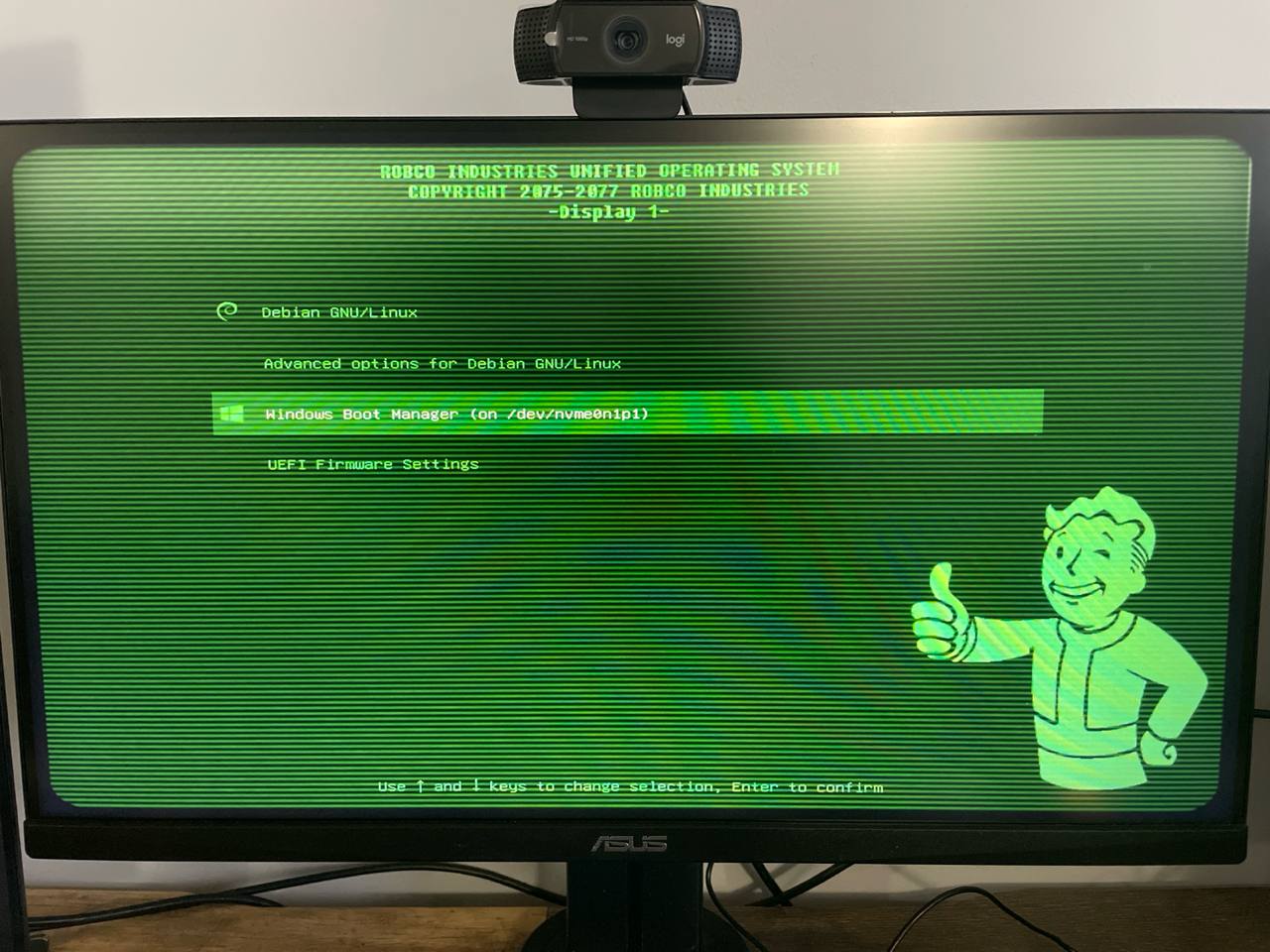 GRUB shows Windows again
I boot Windows and everything worked as expected.
Conclusion
Make sure the EFI partition has the correct settings, because while it could boot, some tools will fail to work properly.